
Free Stock Trading in Canada 2026

Canada’s best free stock trading apps are giving DIY investors more control over their investments than ever before. With zero-commission stock and ETF trades, investors can build their own portfolios without trading fees cutting into long-term returns. Online investing has never been so easy or affordable.
However, it’s important to understand that a “free stock trading app” doesn’t mean there are no costs at all. While many Canadian online brokers have eliminated commissions on stock and ETF trades, they still generate revenue through currency conversion fees, foreign exchange spreads, payment for order flow, and optional premium account features. Knowing how these platforms make money is key to choosing the best “free” trading app for your investing needs.
Since platforms like Robinhood disrupted the U.S. market, Canadian DIY investors have increasingly looked for low-cost alternatives to traditional brokerages. Today, several Canadian stock trading apps offer commission-free investing with user-friendly platforms and competitive features. Some, such as Qtrade, are making continuous improvements, such as with the introduction of 100% free trades.
Here’s our quick comparison of the best free stock trading apps in Canada. For a more complete breakdown, visit our in-depth Best Online Brokers in Canada 2026 guide.
Comparing The Best Free Stock Trade Brokers For Canadians
When selecting a broker, the key is to look for hidden charges and fees that might not be advertised up front. We’ll break it down below in our review of the six best zero-commission online brokers in Canada.

 4.9 / 5
FREE to buy and sell ETFs
100% FREE
 4.3 / 5
Free to buy and sell ETFs
Free trades + ECN Fees
 3.9 / 5
$0 for 50 ETFs
$0 for first $50 North American stock and ETF trades per year, $9.95 thereafter
 4.2 / 5
$0 for TD ETFs only
$0 for the first 50 stock trades per year, $9.99 thereafter
 3.5 / 5
$0 for buying or selling ETFs
$0 for buying or selling stocks
 3.3 / 5
$0 for buying or selling ETFs
$0 for buying or selling stocks
No Available Promotion
 3.1 / 5
$0 for buying or selling ETFs
$0 for buying or selling stocks
No Available Promotion
While there are multiple options to choose from when it comes to free stock trading in Canada, you’ll want to know about any hidden fees, what products are on offer, and most importantly, know that your money is safe and sound.
Read on to find out more about what to expect from each of our top picks, and to find out which one might be really worth it for you and your goals.
What is Free and What Still Costs Money?
We’ve given you the rundown on the free ETFs and stocks, and minimum account deposit costs, so now let’s take a look at other commissions and fees that these brokers charge. This is often a place where brokers charge more in order to make up for the lost commission on trades.
Broker | Mutual Funds | Options Trading | Annual Fee | Inactivity Fee |
Free | $0 per trade + $0.75 per contract | None | None | |
$9.95 per trade | $0 per trade + $0.99 per contract | None | None | |
RBC GoSmart | Not Available | Not Available | None | None |
TD Easy Trade | Not Available | Not Available | None | None |
Wealthsimple | Not Available | $0 per trade + $0 per contract | None | None |
$0 for buying or selling most funds | $0 per trade + $1.25 per contract | $100 (can be waived if certain requirements are met) | None | |
$0 for buying or selling most funds | $1.25 per contract, minimum $8.75 | $100 per year for registered accounts: RRSP/LIRA & RRIF/LIF, $50 per year for RESP, waived if certain requirements are met $0 for TFSA and FHSA | $30 inactivity fee per quarter, waived if certain requirements are met |
We can see that although some brokers are really committed to offering free services to their clients, others are making up for it in other places.
1. Qtrade – Best Free Stock Trading in Canada
One of our top recommended discount brokers in Canada, Qtrade, now offers free trading as well as no annual account fees! Qtrade’s got a fantastic promo offer, a free portfolio simulator to help new investors learn the ropes, excellent customer service, and a wide range of account options.
- Free ETF Trades
- Free Stock Trading
- Options Trading Fees: $0 + $0.75 per contract
- Annual Fees: $0
- Full Review: Qtrade Review
2. Questrade – Best For Low Fees
Questrade entered the ranks of free stock trading apps for Canadians in 2025. In other words, they now charge $0 in stock trading fees, as well as $0 for ETF trades. That said, they do include ECN fees on trades in certain situations. The excellent research options available are a step up from the other no-commission platforms out there. All that said, customer service still continues to be tough for Questrade.
- ETF Trading Fees: Free + ECN fees
- Stock Trading Fees: $0
- Options Trading Fees: $0 per trade + $0.99 per contract
- Annual Fees: $0
- Full Review: Questrade Review
3. RBC GoSmart – Best Big Bank Free Brokerage
RBC GoSmart is a streamlined investing account designed for beginners who want to manage their investments through the RBC Mobile app. Investors receive 50 commission-free stock or ETF trades each calendar year, along with unlimited free trades on more than 50 selected ETFs. It’s worth pointing out that the selected ETFs are some of the best ETFs in Canada, so it’s definitely possible to be totally commission free with this app. This ETF advantage is why we give it a slight edge over TD at the moment.
The platform is limited to Canadian-dollar TFSAs, RRSPs, and FHSAs. You can buy Canadian and U.S. stocks and ETFs, but the account cannot hold U.S. dollars, so currency conversion costs will apply whenever you trade a U.S.-listed investment. Options, mutual funds, bonds, margin accounts, and non-registered accounts are not available.
- ETF Trading Fees: $0 for more than 50 select ETFs; the first 50 other stock or ETF trades each year are also free, followed by $9.95 per trade
- Stock Trading Fees: $0 for the first 50 trades per year, $9.95 thereafter
- Options Trading Fees: N/A
- Annual Fees: $0
- Full Review: RBC Direct Investing Review
4. TD Easy Trade – Best Big Bank Brokerage for Fractional Shares
TD Easy Trade is a beginner-friendly, app-only brokerage that allows investors to buy fractional shares of eligible Canadian and U.S. stocks and ETFs with as little as $1. This makes it a particularly good option for new investors making smaller contributions or anyone who does not want to save enough to purchase a full share of a high-priced investment.
The platform provides 50 commission-free stock and ETF trades each year, including fractional-share trades. There is no minimum balance, no annual account fee, and investors can hold both Canadian and U.S. dollars. The main limitation is that TD Easy Trade remains a relatively basic mobile platform and does not support options trading, plus it’s ETF trades are limited to TD-specific ETFs.
- ETF Trading Fees: $0 for the first 100 stock and ETF trades per year; $9.99 thereafter for orders of at least one full share or $1.99 for fractional orders below one share
- Stock Trading Fees: $0 for the first 100 stock and ETF trades per year; $9.99 thereafter for orders of at least one full share or $1.99 for fractional orders
- Options Trading Fees: N/A
- Annual Fees: $0
- Full Review: TD Easy Trade Review
5. Wealthsimple Trade – Best $0 Commission Broker
When it comes to free, Wealthsimple Trade delivers. It offers 100% free commissions on all trades, and is one of the few brokerages offering crypto trading. Because of its low costs, customers shouldn’t expect stellar customer service, and some will find its platform to be too basic for their needs.
- ETF Trading Fees: $0
- Stock Trading Fees: $0
- Options Trading Fees: $0 per trade + $0 per contract
- Annual Fees: $0
- Full Review: Wealthsimple Trade Review
6. National Bank Direct Brokerage – Best Bank For Free Stock Trades
As far as the big banks go, National Bank Direct Brokers, or NBDB, was one of the first to offer free trading. While it is one of the few brokers with a brick and mortar presence, its trading platform definitely needs some work to compete with the other purely online brokerages offering zero-fee trading.
- ETF Trading Fees: $0 for trades made online
- Stock Trading Fees: $0 for trades made online
- Options Trading Fees: $0 + $1.25 per contract
- Annual Fees: $100, unless account holds over $20,000, you have an InvestCube account, are a “Young Investor”, or are enrolled in a NBDB offer for professionals or newcomers.
- Full Review: National Bank Direct Brokerage Review
7. Desjardins – Best for Active Traders
Desjardins waited a while to jump into the free online trading game, and as such, they still have some work to do to get caught up. The platform leaves a lot to be desired, and even so, comes at a cost. While Disnat Classic is free of charge, Disnat Direct, which is aimed at more active traders, can cost up to $105 per month (unless traders make a certain number of trades per month or have a portfolio valued above $15,000).
- ETF Trading Fees: $0
- Stock Trading Fees: $0
- Options Trading Fees: $1.25 per contract/$8.75 minimum
- Annual Fees: $0 for TFSA and FHSA, $50 for RESP, and $100 for RRSP/LIRA and RRIF/LIF if certain requirements are not met. Additionally, there is a $30 inactivity fee per quarter if certain requirements are not met.
- Full Review: Disnat Review
Commission Free Investing Canada: Is It Really Free?
Growing up, grandpa might have told you nothing is ever free.
While that might not be 100% true, it’s a cliché for a reason. Brokers need to make money somehow, and if it’s not from your trades, then where does it come from?
Some online brokers sell your purchase information to other Wall Street companies so that those “big fish” can then turn around and “front run” your trade – making them massive profits in the long run as they continuously skim miniscule amounts from millions of investors every day.
Another thing to be aware of is that some online brokers will purposely delay the payment for order flow – leading to slightly higher buy prices and marginally lower sell prices.
Many experts say that such practices should not be allowed, as it is allowing big investment firms access to unfair advantages. Others argue that without these methods in place, traders will not be able to access commission free ETFs or stocks, which may turn some potential investors off from jumping into the market in the first place.
Over time, we believe some of these strategies will no longer be allowed as regulators clamp down on these potentially unfair practices. Until then, it’s best to do your research and decide what you’re willing to give up to save money on your investments.
Free stock trading brokerages also make big bucks in areas like cryptocurrency trading (which has very high fees), as well as foreign exchange. You might not have realized it, but every time you buy a stock on the New York Stock Exchange or NASDAQ you’re first converting your Canadian Dollars to American Dollars. These free stock trading brokers charge a pretty sizable mark up on that exchange.
These no commission investing platforms also make money from your money – your cash that is. Having cash sitting in your brokerage account allows the brokerage to collect interest on it. That interest is way more than they’re paying you!
How to Choose a Free Trading Platform in Canada
Whether you are choosing a free trading platform in Canada or another brokerage, you want to make sure you have a variety of options, that your money and information will be safe and secure and that you can access the account when, where, and how you prefer.
When looking at investment options, you should consider what free products are offered. For example, although free trading platforms like TD Easy Trade and Wealthsimple Trade are free, you won’t have the flexibility of choosing from all the available investment options out there. If you are looking for tax-advantaged accounts, such as RRSP and TFSA, you need to be sure the free stock trading platforms you’re looking at have them.
Safety and security are also top of the list when it comes to investing your precious money, so look for brokerages that are insured by Canadian regulatory bodies. Other security features such as data encryption and 2-factor authentication are definite musts. In case of any security emergency, you want to make sure that a customer service representative will be able to help. So, it’s worth looking into how the free stock trading platform you’re considering fares in that area.
Finally, with more investors relying on mobile versions of trading platforms, then it might be a deal breaker for you if the brokerage doesn’t offer a mobile app or if the app is buggy.
Keeping these factors in mind, you should be able to choose the best free stock trading platform in Canada for you.
How to Buy Individual Stocks in Canada for Beginners
So, you now know the stock market basics and what brokerages are out there to help you start trading. The next step, and the most important, is to choose the right brokerage and start investing!
Ready to get started? Follow these 3 simple steps.
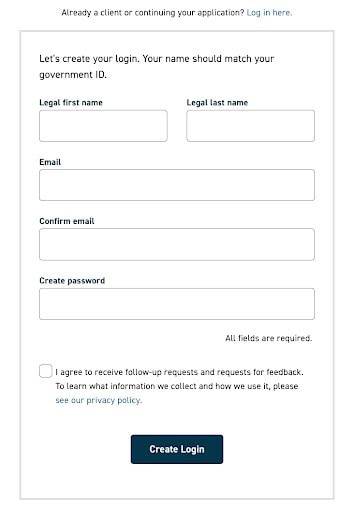
Step #1: Open Your Brokerage Account
If you want to cut costs to the bone and decide to go with the discount brokerage route here’s how you would get started with one of our top online brokerage picks, Qtrade.
Head over to Qtrade to create a new account.
Step #2: Choose the Account Type
We recommend that you first max out your tax advantaged registered accounts first, as long as you qualify. Here are the different types of registered accounts.
In Canada, you can choose from:
- Tax Free Savings Account (TFSA)
- Registered Retirement Savings Plan (RRSP)
- Registered Education Savings Plan (RESP)
- First Home Savings Account (FHSA)
We have all the details you need to know to invest using registered accounts. Head over to our TFSA vs RRSP article to start learning more.
If you don’t yet qualify for a registered account, no problem! You can choose to open a non-registered account.
Step #3: Start Investing
Once you’ve logged in and selected the investment account you want to make a trade in, you can go ahead and start preparing to make your first trade!
We recommend doing your due diligence on the companies you are thinking of investing in. There are a lot of choices of stocks to invest in, but not all are worthy of your money. You can check out our top TSX dividend picks as a starting point, as well as by using the educational resources provided by your brokerage.
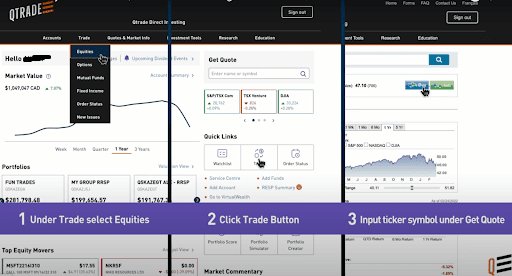
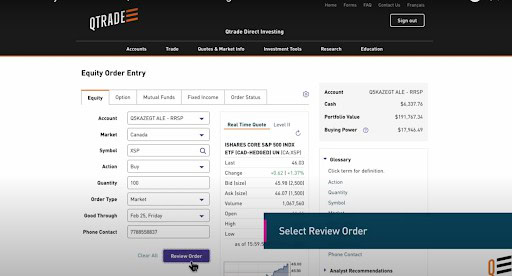
After selecting the ticker symbol for the stock you want to purchase, complete the necessary information on the next page as shown below:
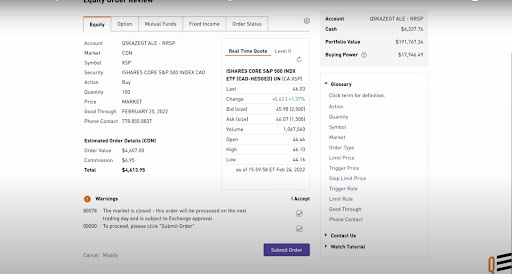
Almost there! Now, you just need to review the order. If everything looks good, you are ready to submit.
To track orders, simply click on the “Order Status” tab to check on how things are going.
For stock market beginners, the toughest trade to make is the first one, which is totally understandable as it’s all new to you.
After that, you can easily follow the same simple steps to trade again and again! Soon you will be trading with confidence as you watch your investments start to grow.
How to Build an Investment Portfolio for Beginners
Now that you know how to buy stocks in Canada, the question is just which stocks (or other investments you should buy).
Investors often refer to all the investments they own as their “portfolio”.
Most Canadians (and investors around the world for that matter) are best off if they focus on diversifying their portfolio as much as possible.
This means making sure they are invested in companies from around the world and from all the different sectors. But it also means investing in something other than stocks (because stocks can go up and down by 30%+ in a very short time). For most people this means some balance of stocks and bonds in their overall investment portfolio.
Here’s a great video describing the difference between the two:
The quickest way to buy an instantly diversified portfolio is through an all-in-one ETF. This type of investment lets you invest in many companies and many government bonds just by purchasing one single ETF using the steps above.
Here’s our Ultimate Guide to all-in-one ETFs in Canada
If you want to read more about managing risk and how much to put in bonds vs stocks, I recommend checking out our Free eBook.
Frequently Asked Questions
Selecting a the Best Free Stock Trading Broker for Me
When I began investing on my own over two decades ago, free stock trading in Canada simply didn’t exist. Buying or selling shares meant going through a major bank brokerage, dealing with outdated platforms, and paying trading commissions that often hit a whopping $20 per transaction. For smaller portfolios, those fees hit hard and made it tough to build wealth over time.
Today, the Canadian online investing landscape looks completely different. Increased competition from platforms like Qtrade, Questrade, and Wealthsimple Trade has driven down fees and dramatically improved the tools available to DIY investors.
Canadian investors now have more options than ever before, but there’s an important reality check:
No stock trading platform is truly “free.”
While commission-free stock and ETF trades are now common, every brokerage earns revenue somewhere. That might come from foreign exchange fees, currency conversion spreads, premium account upgrades, or other behind-the-scenes costs. The key to successful DIY investing isn’t just finding a low-cost broker: it’s understanding where those fees exist so you can avoid unnecessary expenses and keep more of your returns.
For investors looking for a strong all-around platform that offers:
- Low trading costs on stocks
- Free ETF purchases and trades
- A clean, intuitive experience on both desktop and mobile
- High-quality customer support
Qtrade stands out as my top choice.
It consistently earns the top spot in my Canadian online brokerage rankings thanks to its balance of pricing, usability, and service. It continues to improve and innovate year after year. Recently, it switched to 100% free trades and no annual account fees.
Qtrade is also currently offering the best promotion I’ve seen in the Canadian brokerage space. They’re clearly in growth mode, and for anyone considering a switch, this could be an excellent opportunity to take advantage of a substantial sign-up bonus. For full details, check out my complete Qtrade review.








I am totally surprised by this list… There are ONLY three free fee brokerages in Canada, Questrade, NA and WeathSimple. Questrade is the BEST by a mile.
TD Direct is not free.
The TD Direct platform has many flaws. You can’t open a joint account. You can’t designate a beneficiary. You can’t buy ETFs from providers other than TD… Might be a “good” product for someone who doesn’t have a family or a partner.